Showing posts with label Chromebook. Show all posts

Friday, March 10, 2017

360° Videos


I am a big fan of the whole 360° video sensation sweeping across education at the moment. I like the Google Cardboard/VR Headset idea, but we don't have very many of these in our district. What we do have are big SMARTBoards, 70 Inch Monitors, iPads, and Chromebooks. So we can still utilize the videos, but just not as immersively as the Cardboard experience. 

YouTube has lots of 360° videos posted. However, just a search for 360° video can bring up some inappropriate videos as well. So don't just turn students loose. The teacher should be the one to search. 

I really like the National Geographic videos. Here is a link to their playlist

Don't forget about the Google Arts and Culture website. Many Street View and some 360° views can be found in it as well. 

Some people are afraid to use YouTube with students do to the recommended videos and comments section. So here are a few tips to get around that.

1. Use a tool like https://safeshare.tv/. Enter your YouTube video URL into the box and Generate a Safe View


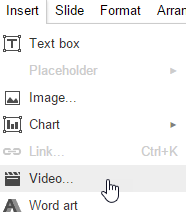
2.  Use the Insert Video option in Google Slides. Then in Present mode, the 360 Video will still work. 

A Few of my favorite 360° examples


Monday, January 30, 2017

Google Arts & Culture


I attended several 30-minute webinars from Simple K-12 over the weekend. Simple K12 is usually membership based one demand lesson plans and webinars and more, but they do offer free webinars as well that anyone can sign up for.

One of the sessions I attended was “Virtual Explorations and Field Trips with Google Tools” with Jerry Swiatek. @jswiatek

He talked about Google Maps and Google Earth, but he could have spent way more than his 30 minutes on just the Google Arts and Culture site. What an amazing resource.

Art classes can zoom in to famous paintings to see brush strokes.
Make sure to check out the projects section for curated media over various topics.

Look up Historical events and figures.

Look at all of the Partner websites associated with this cultural institute site.

See content curated by place.


So much to explore on this site. I strongly urge you to take a look. 

Thursday, January 12, 2017

New update to Google Classroom


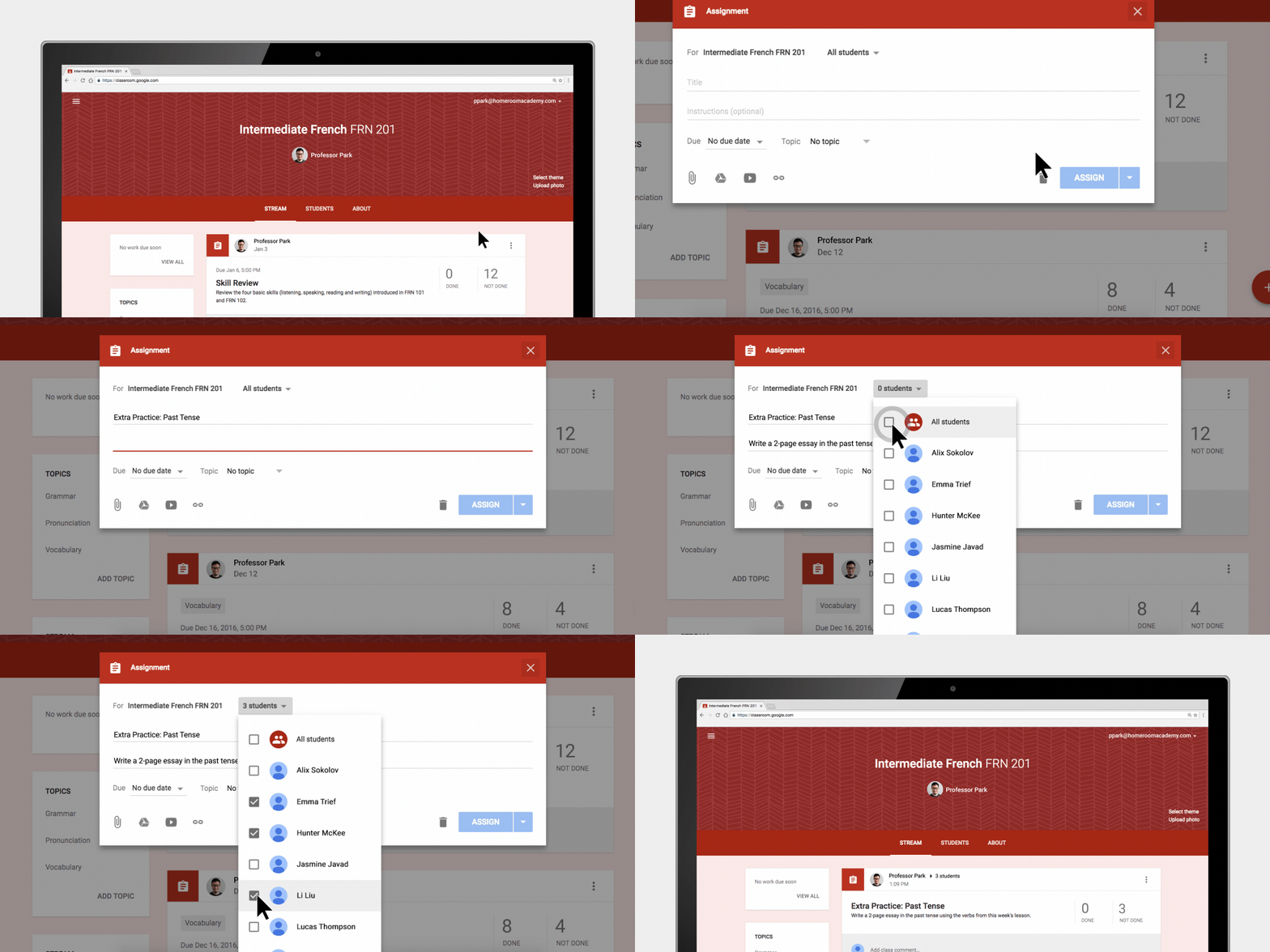
A welcome update to Google Classroom has arrived. Teachers now have the ability to differentiate assignments in Classroom. When a teacher adds an assignment, that assignment can be assigned to one student, multiple students, or all. Many teachers have asked for this and it finally has been added. Great new addition to a wonderful product.

1. In the class in your Classroom, hover over the Add plus button and select Create Assignment

2. Enter the title and any instructions needed.

3. To post an assignment to individual students, click the Down arrow next to the All students.

4. Click All students to deselect it.

5. Select the student(s) by checking each student's name.

6. Add the due date, topic, and materials as needed for the assignment.

7. Click the Assign button.


Wednesday, April 15, 2015

Chromebook Tutorials


I really like my Chromebook. I use it almost exclusively during meetings and travel. I can access pretty much everything I need to access on the web including my various work and personal email, my work and personal Google Drive, and my Microsoft account for my OneNote notebook where I do the majority of my note taking. Yes, you pretty much have to have Wi-Fi to use the Chromebook, but at work, at home, and traveling that doesn't seem to be to much on an issue.

More and more of our campuses are purchasing Chromebooks for student use. I recently came across the following blog post with videos of basic things you should know how to do to use your Chromebook. Some good stuff. Take a look.

http://www.educatorstechnology.com/2015/03/10-must-watch-video-tutorials-for-chromebook-users.html


You can also access these from their YouTube channel.

https://www.youtube.com/playlist?list=PL5aqr5w5fRe58vnBat8-O6lBB2lreLG0C

Friday, August 8, 2014

30 Ways to use Chromebooks in Schools

If you just received Chromebooks in your classroom or you are debating between a Chromebook and some other tablet device, here is a really good presentation from Tom Gierke and Becky Evans on 30 ways to use Chromebooks in schools. Some great ideas here.

http://goo.gl/5cF0RK