Wednesday, July 8, 2015

ClassTools.net


ClassTools.net is easily one of my favorite sites. It gives teachers and students the ability to "create free games, quizzes, activities, and diagrams". This site is free and very easy to use.

Some of my favorite tools on this site:
Fakebook and Twister - create fake Facebook and Twitter posts. Great to use for historical or fictional characters.
Random name Picker - just as it describes
Countdown timer - you can add a tune or YouTube video to your timer.
Venn Diagram Template
Citation generator

And the newest game creator, Pac-Man. This is a great review game creator. Make sure to use the help section to learn how to enter questions and answers. Students answer questions and continue to play Pac-Man until they get a question incorrect.


Tuesday, June 16, 2015

Google Slides Background

From Kelly Fitzgerald comes a great tutorial on some of the issues of a picture background on Google slides and how you can use the Slides master slide to help.


Make sure to check out Kelly's blog at http://edtechnut.blogspot.com/ . You wont be disappointed! She is a wonderful Google trainer and leader in the EdTech community. 

Wednesday, June 10, 2015

Molview.org

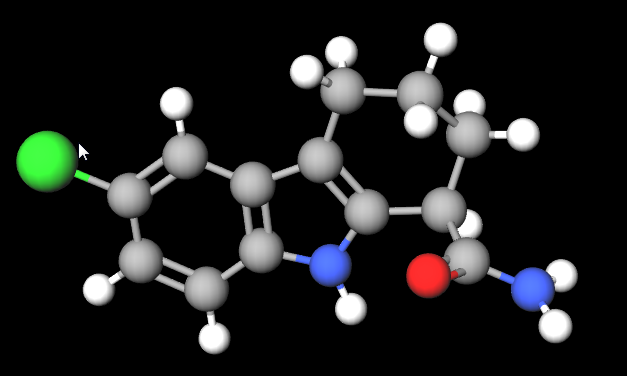
So have you ever been asleep and woke up wondering what the 6-chloro-2,3,4,9-tetrahydro-1H-carbazole-1-carboxamide compound looks like*? Well wonder no more. You can now view and build 2d and 3d models of molecules. Molview is an open-source web app to help build those chemistry and biology models. http://molview.org/

There is a pdf manual you can download to help get started. Since this is HTML5 based it should work pretty much on any device.


By the way 6-chloro-2,3,4,9-tetrahydro-1H-carbazole-1-carboxamide compound looks like this.


(* In a spirit of openness, I have no idea what 6-chloro-2,3,4,9-tetrahydro-1H-carbazole-1-carboxamide is. It came up when I started typing in the search box and I though it looked cool.


Tuesday, May 26, 2015

Managing/Toggling Between Multiple Google Accounts

A great video on how to manage between multiple Google Accounts. Such an easy setup for a work and a personal Google account that can have different apps and add-ons.


Tuesday, May 19, 2015

21 Things

From the REMC Association of Michigan comes two web sites that help boost your technology knowledge. One is for students and the other is for teachers.

www.21things4students.net


www.21things4teachers.net


Both sites provide twenty-one lessons that are aligned with the ISTE student and ISTE teacher standards. ISTE stands for the International Society for Technology in Education.


Both the student and teacher 21 things cover topics such as What is the Cloud, digital citizenship, and using technology for school and work. All the lessons have short videos to watch and activities to practice the skills learned.

The teacher site gives teachers many tips on how to integrate technology into their classroom as well as opens teacher to new technology tools.

Give these a look to help improve your technology knowledge. . 

Thursday, May 14, 2015

Google Apps for the iPad

If you missed the Google Education on Air event last weekend, you missed many great sessions from real teachers using GAfE in their districts and classrooms. You can view all of the sessions from the Google Education on Air event site. https://educationonair.withgoogle.com/live/2015-may

One that I would point out that I particularly enjoyed was Kasey Bell's session on Google Apps for iPad. It used to be Google and iPads didn't play nicely. But now there are 50 Google apps that work on the iPad. The power of combining the two in the classroom can't be matched.

Make sure to visit Kasey's Shake Up Learning site for her presentation and handout resources. And follow her blog for great Google and EdTech tips.

http://www.shakeuplearning.com/google-apps-for-the-ipad-googleeduonair-2015.html


Tuesday, May 5, 2015

Evernote's Clearly extension


The popular notebooking app Evernote has an extension for your browser you should check out. Clearly allows users to view websites distraction free. Install the extension on your favorite browser from https://evernote.com/clearly/ . You should see a small desk lamp icon on browser tool bar. 


Now when a user visits a website or blog post they can click the Clearly icon to view the website without all of the graphics, adds, and other distractions. Users of Evernote can even save the site to their Evernote notebook to view later. Users can mark up the new document as well as print the cleaned up copy. 

Here is an example from our local newspaper.

Before Clearly:


After Clearly:

As you can see, the article is much easier to read without all of the distractions from the regular website. If you are looking for something to help students focus in to online content, try Clearly


Monday, April 27, 2015

Search Better on Google

The Google Search Education web site wants to help you and your students become better searchers. As we all know getting information off of the Internet can be like drinking through a fire hose; too much information to sort through.
This site provides teachers will lesson plans and activities, a Power Searching online course they can take, A Google a Day Challenges (some of these are really hard!), and video trainings from the experts at Google. Make sure to check it out.

http://www.google.com/insidesearch/searcheducation/