Friday, May 19, 2017

Summertime Google Training


https://edutrainingcenter.withgoogle.com/training

Did that say Summertime? How about anytime training? Training all online, on demand, when you are ready to learn.

Many of our teachers in the district have received or will be receiving carts of Chromebooks. The question now is how to use them with students. While teachers may be proficient in the Google tools they utilize, using the tools to enhance the curriculum is another challenge. That is where the Google for Education Training Center comes in.


Teachers that need help getting started should start at the Fundamentals Training. If teachers feels a little confident, the Advanced Training course is available.

Feel like a real beginner? Then maybe start at the Resources section to learn the different Google Tools (like Docs, Slides, Classroom...) as well as all about the Chromebooks.

A wonderful resource for teachers to increase their confidence using Google in the classroom. 

Friday, May 12, 2017

Google Classroom: End-of-Year Clean Up

Great, simple to follow video on cleaning up your Google Classroom classes for the end of the year.

Wednesday, April 12, 2017

IFTTT part 2


So I was successful in getting my Blogger post and my Twitter feed to post to may Scott's Place Facebook page. Yea for small victories!
But the page seemed to pull a random picture, So I am posting one here to see if it gets pulled over instead. Cross your fingers.

IFTTT

I am testing out IFTTT.com to see if I can get Blogger to post to my Facebook page,  https://www.facebook.com/scottfirenza/

IFTTT (If This, Then That) creates recipes to automate tasks. You set the trigger and then something happens.

Like I said, just testing it.

Edit 1:
So it worked, kind of. It went to my district technology Facebook page  https://www.facebook.com/lisdtechdeploy/ . So I had to go into the IFTTT settings and reset the page to the Facebook page for Scott's Place.

Friday, March 10, 2017

360° Videos


I am a big fan of the whole 360° video sensation sweeping across education at the moment. I like the Google Cardboard/VR Headset idea, but we don't have very many of these in our district. What we do have are big SMARTBoards, 70 Inch Monitors, iPads, and Chromebooks. So we can still utilize the videos, but just not as immersively as the Cardboard experience. 

YouTube has lots of 360° videos posted. However, just a search for 360° video can bring up some inappropriate videos as well. So don't just turn students loose. The teacher should be the one to search. 

I really like the National Geographic videos. Here is a link to their playlist

Don't forget about the Google Arts and Culture website. Many Street View and some 360° views can be found in it as well. 

Some people are afraid to use YouTube with students do to the recommended videos and comments section. So here are a few tips to get around that.

1. Use a tool like https://safeshare.tv/. Enter your YouTube video URL into the box and Generate a Safe View


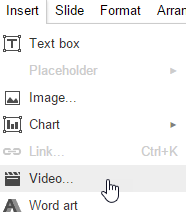
2.  Use the Insert Video option in Google Slides. Then in Present mode, the 360 Video will still work. 


A Few of my favorite 360° examples


Monday, February 27, 2017

Technology Integration

Make sure to read* the following two posts from Eric Sheninger's blog, A Principal's Reflections.

Is Technology Being Integrated Effectively?

A Pedagogical Shift Needed for Digital Success

Great reminder for anyone looking to use technology with students. The tech is a tool. Pedagogy should come first.


* I don't normally just link to someone's blog and just say read this. But a lot of times I use this blog as my reminder and as a way to save ideas. This idea from Eric is one message I try to keep in the forefront of the message I try to share with my district anytime I get the opportunity to do so. 

Thursday, February 23, 2017

Digital Learning Day 2017

Our district has been participating in the Digital Learning Day #DLDay @OfficialDLDay. Check out this Twitter search to see what Lubbock ISD is doing.
Follow us on Twitter as well. @LubbockDL, @LISDtechdeploy


Wednesday, February 22, 2017

Adobe Spark


Another post about my TCEA17 experience.

I have written about the Adobe Spark apps before, this time last year when I was posting my TCEA thoughts,  but they were another big topic this year at TCEA. So I thought I would mention them again. It never hurts to keep these great tools in the spotlight.

Spark is broken down into three sections Post, Page, and Video. All three programs can be accessed from https://spark.adobe.com/ or through their respective iOS apps.

Handout from a Workshop

Adobe's Edu Spark Guide


The biggest thing I heard out of sessions talking about Spark is the fact students under the age of 13 cannot create their own free Adobe account. For students with Google accounts, logging in with Google is very simple. But for students under 13, the teacher will need to create some kind of monitored account for the students to use. 

Here is a video on a very easy way for teachers to create those accounts using the Plus Addressing technique.


Spark Post is the social graphics creation program. Great tool, easy to use, and flexible are some words I have heard people use to describe Post. The basics; pick a photograph, add text, and apply your design. 

example - 


Spark Page is their webpage creation tool. But more than just your average webpage. Pages can really tell a story with graphics, video, and text in a magazine-style format. 
Here is a good example. 


Spark Video is probably my favorite tool with my relationship with digital storytelling. Users can add their own photos and videos, use the provided icons, add soundtracks, cinematic motion, and best of all, record their own voice.  
Here's an example.


Give these three tools a try and then try them with students. If you have iPads, the apps are very easy to use. If you have Chromebooks or other computers, the webpage will be the way to access Adobe Spark.

Friday, February 17, 2017

Digital Pedagogy for Deeper Learning

The next few posts will be my thoughts and a-ha's from TCEA 17 convention.

On Wednesday, Feb. 8th, I had the honor of attending Eric Sheninger's session Digital Pedagogy for Deeper Learning.

First of all, great session. He really presented well and kept the audience engaged with questions to respond to through our devices. I was too busy listening and tweeting that I really didn't get a chance to take notes. I didn't want to miss anything. But I will do my best to relay the message.


Some of the main takeaways I got:

1. If we don't get pedagogy correct, all of the technology devices in the world isn't going to help.

Technology is a tool to help teachers reach and engage students and their learning. It isn't an event like lunch or PE, something that happens once a day or every once in a while.
He touched on the SAMR model as a good start, but did question where is the focus on learning in this model. Basically, the model should be looking at the task being asked of the student and how can the technology help with that. Too often, I believe the SAMR model gets used as a tool to get more technology in the classroom. That is where TPACK comes into play. TPACK looks at the technology, the pedagogy, and the content together.

2. Rigor and relevance

Eric pointed out several things Rigor is not. It is not more or harder worksheets, AP or Honors courses, higher level book in reading, more work, or more homework. A lot of rigor should be the teacher planning for students to go into deeper thinking and work on the topic.

I've always seen the model drawn out like this.

And I get that. We want students in the upper right quadrant, higher level questioning and thinking, creating...

But when he showed this image, it really kind of hit home.
I tweeted out this picture and it was my most retweeted and favorited tweet of the week. This tells me others have never seen it presented this way either and it triggered something for them as well.

Eric also engaged the audience with different web polling tools such a PollEverywhere and Mentimeter. I have always used Poll Everywhere in the past and look forward to using Mentimeter in a session. Looks easy to use and will also create group word clouds.

He asked the question, "How can the use of tech support and/or enhance pedagogy?" This is what the audience came up with.

A few other leadership takeaways:

In his school they did not collect lesson plans, they collected assessments that were for 2 weeks in the future.

He suggests putting the TEKS standards on your rubrics so students, parents, and community can see them.

Students should create knowledge for the real world, not just for the classroom.  (Reminds me of the quote I hear often, "If your students are sharing their work with the world, they want it to be good. If they're just sharing it with you, they want it to be good enough." ~Rushton Hurley)

Finally, an interesting approach to PD. Give teachers genius hours to learn what they want and have them show their learning and how it helps their classroom in an e-portfolio. Great idea and alternative to the old Sit and Get.

Would love to get Eric to our district to learn with our district leaders.