Showing posts with label iOS. Show all posts

Friday, January 20, 2017

Microsoft Photo Apps


My district has been moving more into the Google world so a lot of my posts and tweets are about Google. Today, I want to share some of my favorite Microsoft camera apps.

Office Lens(iOS | Android)
Office Lens trims, enhances and makes pictures of whiteboards and documents readable. Have you ever been in a meeting or at a conference and someone has a lot of information either on a whiteboard or projected onto a screen. In my case, it is hard to write everything down quickly enough. I've tried taking a picture with my phone, but usually, there is a glare or I am standing at some angle that just makes the picture hard to read. That is where Office Lens comes into play. Office Lens will take the photo, crop, enhance, and straighten the picture and allow you to save in a variety of formats.


Microsoft Pix - (iOS)
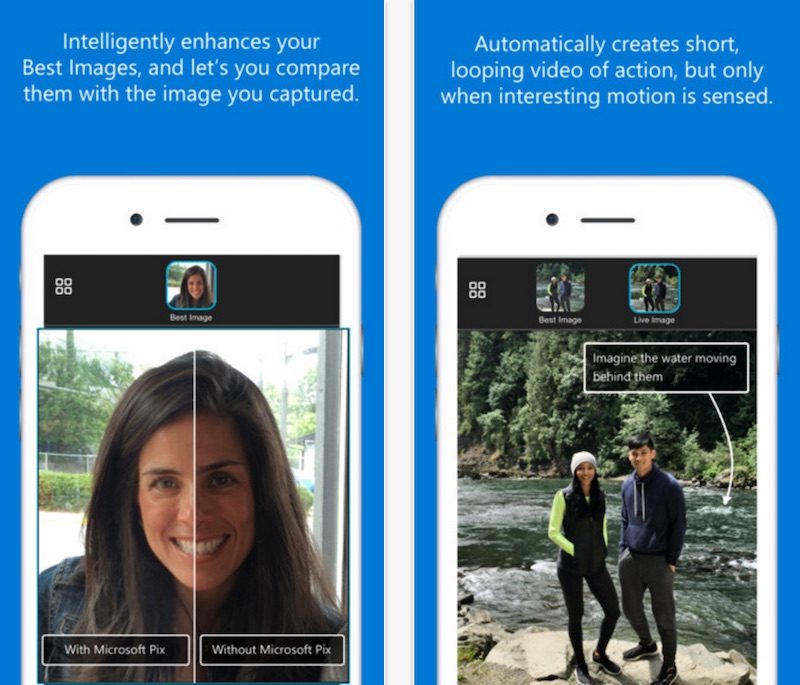
Pix is one of the easiest camera apps for the iPhone and iPad. Just snap the picture, compare the images to select the best photo to edit, and save and share to the apps already on your phone. Pix has face recognition, selects the best image out of a photo burst and works with live photos as well.


Microsoft Selfie - (iOS)
Microsoft Selfie is a selfie and photo enhancement application available on iOS, web and WeChat. A simple tool for creating seflies. The app comes with Intelligent enhancement, noise reduction, and auto exposure editing features.


So if you are looking for ways to use your camera, give these three apps a try. I believe they are worth a look.

Friday, May 13, 2016

Appy Hour


In our last Appy Hour presentation for the year, we had two apps that we wanted to demonstrate to our Administrators. For some background, our Appy Hour is a 15-minute block of time at our Monthly Leadership meetings where our Digital Learning team gets to share apps we know about that will help administrators with their daily tasks. Yes, I get that the title should be Appy Quarter Hour, but that doesn't roll off the tongue as easily.

Our first app we demonstrated was Post-It Plus. This app from the makers of Post-It notes allows the user to scan their paper Post-It note into their device to turn that piece of paper digital. Now their notes are stored and won't be lost in the paper shuffle. The app also allows the user to resize the scan size so it really isn't limited to Post-It note size. Teachers could use this by having students work in groups and write out on Notes and gather those notes as a group for evaluation.
Find the iOS App. It is free with some in-app purchases if you want to create notes in different colors.

The second app we showed was Voice Record Pro 7. This free app allows the user to use their iPad as a digital recorder. It allows the user to record voice memos and on-site sounds at unlimited length with configurable quality. Voice Record Pro 7 can record directly in MP4 (AAC), MP3 (MPEG) and WAV (PCM) formats plus convert function for all supported formats. The power comes from what the user can then do with the file. The user can export to Google Drive, DropBox, Microsoft OneDrive, Box, SoundCloud, post to Facebook and YouTube, and more. If you need a simple (ad-supported) digital recorder app this one works great. The in-app purchase removes the ads at the bottom of the screen. 

Thursday, May 12, 2016

Interactive Math Glossary App


TEA has released an Interactive Math Glossary app for both iOS and Android. This app is meant for K-8 math vocabulary terms that teachers and students can see the definition and examples of what the term is describing. All vocabulary is used in the TEKS.

To download for iOS devices, go to https://itunes.apple.com/us/app/interactive-math-glossary/id1051404376?mt=8. To download for Android devices, go to https://play.google.com/store/apps/details?id=gov.texas.tea.math.glossary&hl=en.

Wednesday, December 16, 2015

Appy Hour... Christmas Edition


I haven't written about our Appy Hour presentations lately, but here is the last one we did. We highlighted 5 iOS apps to get you through the holidays.

Google Keep - iTunes 
Google Keep is a great and simple note taking app. Teachers and students can login to https://keep.google.com to take notes from any browser or use the app. Any note will sync to any device with the Keep app or that can be viewed from a web browser. Keep has the ability to take notes, set reminders, create to do lists, snap photo to add to a note, and share notes with others. If you are looking for a simple way to keep up with Christmas to do lists, or shopping lists, Keep can help keep you organized

Norad Santa Tracker - iTunes 
On Christmas Eve, use this app to track Santa's location.

Christmas Countdown - iTunes
Instead of kids asking every 5 minutes, "When is Christmas? When is Santa coming?", install this fun little countdown app to let them check. 

Tiny Calm - iTunes
So the kids are driving you nuts, your Christmas cookies are crumbling, the cat knocked over the tree again, and you just found out your in-laws are staying an extra 3 days. You might need to enhance your calm. Use this simple meditation app to do just that. 

Nutshell - iTunes
Nutshell is an app that tells you to snap three photo and capture a moment. As you snap the photos, you are really taking video. The videos just stops and focuses on each photo you took. So you are capturing the moment in a nutshell. Add text and small animated icons to your photos for more excitement. Then save the video to your camera roll and upload to your favorite social media to share your nutshell moment.  

Wednesday, January 14, 2015

The Google Translate App

Google recently announced an update to their Google Translate app that many in education or those that travel will definitely appreciate.

The app will now do a real time conversion translation of road and street signs, menus, and other text by using the camera. Many are familiar with Word Lens app that I have blogged about it in the past. Google purchased Word Lens and made it free for all languages it supports. Now they have gone one step further to integrate that into their existing Translate app.
This works for English to and from: German, Italian, Portuguese, French, Russian and Spanish with plans to add more languages soon.

(Android and iOS)

Check out their announcement here. http://googleblog.blogspot.com/2015/01/hallo-hola-ola-more-powerful-translate.html

https://blogger.googleusercontent.com/img/b/R29vZ2xl/AVvXsEiaBs-5m8Hw6YEutaVZ5d6SYDaXoipz5mZ4ecuWKH7ewIoaD9Qdd48PnPUgkHpWr4tpbo-Nb-GcdHx8Rk7ZAD-cGDk96YTeUcxC8mCtuAmPELMNJvUxkPlN65XOqY9NudidBPgFD5ZKmCw/s1600/Google+Word+Lens+iPhone+GIF.gif

Wednesday, November 12, 2014

Appy Hour

I have been asked to attend our district's monthly Leadership meetings to help present an "Appy Hour" time of the meeting. The hour in the title is a little misleading. We have 15 minutes and Appy Quarter-hour just didn't have the same ring to it.

The first month we were asked to present Google Apps for Education as it is new to most of our leadership team. So we did. It seemed to go over well and we are seeing an increase in GAFE usage with teachers and students. Not really an app, but useful.

The second month we were asked to present the SAMR model. Ok, I know you are asking when are we getting to the Apps of Appy hour. Because we were. SAMR is rushing through education at the moment as a model for helping teachers take a look at their classroom assignment and help layer technology to either enhance the lesson or transform the lesson.

A pretty good video explaing the SAMR model.


So, the third month, a review of SAMR with a look at some TEKS and some substitution and augmentation examples, and finally some apps.

So we decided on these three apps to mention.

Mastery Connect TEKS - displays core content TEKS. There is an iOS and Android app
https://itunes.apple.com/us/app/texas-state-core-standards/id892241715
https://play.google.com/store/apps/details?id=com.masteryconnect.tx 

Then we did a small App Smash with the next two.

DocScan HD - take a picture of a document and turn it into a PDF or JPEG. The free version allows you to save to your iPad and email the document. The paid version allows you to upload to cloud services like Box, Dropbox, and Google Drive.
https://itunes.apple.com/us/app/doc-scan-hd-scanner-to-scan/id467016332?mt=8 has in App purchase of $3.99 to upload to cloud services.

Since we can upload to Google Drive, the third app we showed as Drive.
Basically we showed the same functionality of the web version with creating, editing, and sharing documents.
https://itunes.apple.com/us/app/google-drive-free-online-storage/id507874739?mt=8
https://play.google.com/store/apps/details?id=com.google.android.apps.docs&hl=en

Not sure what the fourth meeting will hold yet. It will be in December, so I am thinking some photo and video editing apps since the holidays are times for taking pictures.
Any suggestions?

Tuesday, August 19, 2014

All the TEKS in your pocket


From MasteryConnect comes an amazing tool for Texas teachers. They have an app with all of the TEKS, our Texas state standards. There are also apps for other states. Every grade level standards for math, science, social studies, and language arts and now at the teacher's fingertips.

Make sure to check out this easy to use tool.

iOS - https://itunes.apple.com/us/app/texas-state-core-standards/id892241715

Android - https://play.google.com/store/apps/details?id=com.masteryconnect.tx


Friday, May 23, 2014

Painting and Drawing apps


I recently had a parent ask about art type apps for their teenager to use on the iPad. I am not an artist in any sense of the word. My stick figure people and animals used to draw laughs from my students. So through a little research I came across this blog post from Graphite which is part of the Common Sense Media site.
It listed seven apps for painting and drawing that have been reviewed by the group at Common Sense.
Each app links to their review with price, pros & cons, and recommendations for use.

Draw and Tell - by Duck Duck Moose! 

Sketch Guru - by Handy Sketch Pad


Brushes 3

Sumopaint 

Sketchbook Pro

Procreate

ArtStudio


Common Sense Media reviews Movies, Games, Apps for parents so they know what is appropriate for their child. There is also a great Educator Section. And if you are looking for great Digital Citizenship resources, look no further than Common Sense Media's Digital Citizenship Curriculum.

Friday, May 16, 2014

Word Lens App


The iOS and Android app Word Lens is truly amazing. It will translate words on signs, menus, other text from one language to another.

Available language pairs:
+ English ⇆ Russian
+ English ⇆ Spanish
+ English ⇆ French
+ English ⇆ Italian
+ English ⇆ German
+ English ⇆ Portuguese

The language packs used to cost money, but since the app was purchased by Google they are now offering all language packs for free. They still work like an in-app purchase, but it is a Free in-app purchase.

Make sure to pick this one up quickly. You never know when they might change their mind.

iOS- https://itunes.apple.com/us/app/word-lens/id383463868?mt=8 

Android -  https://play.google.com/store/apps/details?id=com.questvisual.wordlens.demo