Monday, January 30, 2017

Google Arts & Culture


I attended several 30-minute webinars from Simple K-12 over the weekend. Simple K12 is usually membership based one demand lesson plans and webinars and more, but they do offer free webinars as well that anyone can sign up for.

One of the sessions I attended was “Virtual Explorations and Field Trips with Google Tools” with Jerry Swiatek. @jswiatek

He talked about Google Maps and Google Earth, but he could have spent way more than his 30 minutes on just the Google Arts and Culture site. What an amazing resource.

Art classes can zoom in to famous paintings to see brush strokes.
Make sure to check out the projects section for curated media over various topics.

Look up Historical events and figures.

Look at all of the Partner websites associated with this cultural institute site.

See content curated by place.


So much to explore on this site. I strongly urge you to take a look. 

Friday, January 20, 2017

Microsoft Photo Apps


My district has been moving more into the Google world so a lot of my posts and tweets are about Google. Today, I want to share some of my favorite Microsoft camera apps.

Office Lens(iOS | Android)
Office Lens trims, enhances and makes pictures of whiteboards and documents readable. Have you ever been in a meeting or at a conference and someone has a lot of information either on a whiteboard or projected onto a screen. In my case, it is hard to write everything down quickly enough. I've tried taking a picture with my phone, but usually, there is a glare or I am standing at some angle that just makes the picture hard to read. That is where Office Lens comes into play. Office Lens will take the photo, crop, enhance, and straighten the picture and allow you to save in a variety of formats.


Microsoft Pix - (iOS)
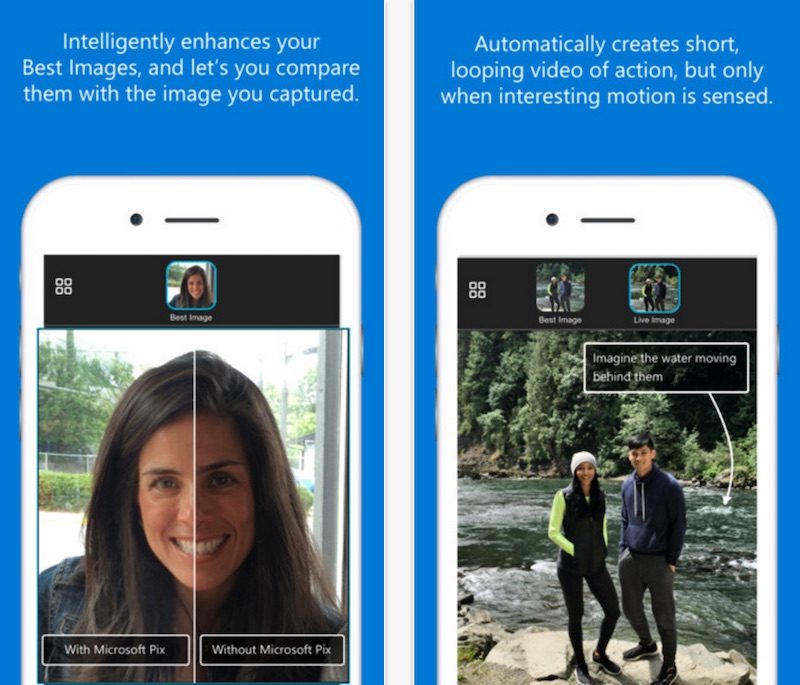
Pix is one of the easiest camera apps for the iPhone and iPad. Just snap the picture, compare the images to select the best photo to edit, and save and share to the apps already on your phone. Pix has face recognition, selects the best image out of a photo burst and works with live photos as well.


Microsoft Selfie - (iOS)
Microsoft Selfie is a selfie and photo enhancement application available on iOS, web and WeChat. A simple tool for creating seflies. The app comes with Intelligent enhancement, noise reduction, and auto exposure editing features.


So if you are looking for ways to use your camera, give these three apps a try. I believe they are worth a look.

Thursday, January 12, 2017

New update to Google Classroom


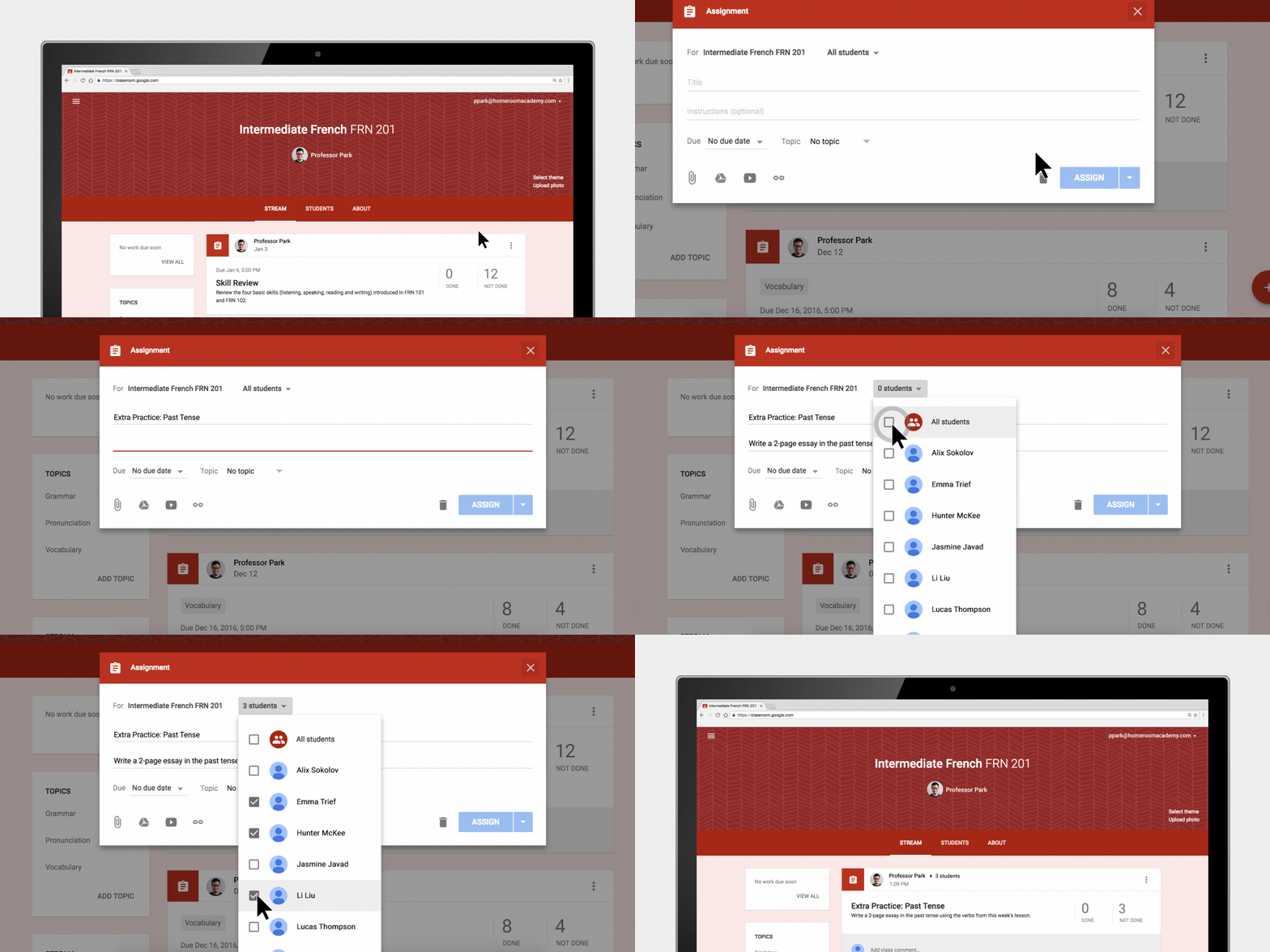
A welcome update to Google Classroom has arrived. Teachers now have the ability to differentiate assignments in Classroom. When a teacher adds an assignment, that assignment can be assigned to one student, multiple students, or all. Many teachers have asked for this and it finally has been added. Great new addition to a wonderful product.

1. In the class in your Classroom, hover over the Add plus button and select Create Assignment

2. Enter the title and any instructions needed.

3. To post an assignment to individual students, click the Down arrow next to the All students.

4. Click All students to deselect it.

5. Select the student(s) by checking each student's name.

6. Add the due date, topic, and materials as needed for the assignment.

7. Click the Assign button.


Thursday, January 5, 2017

Creativity Apps for iPads


Happy New Year! Welcome to 2017. Time to start using that technology in your classroom to allow students to be creators of knowledge instead of consumers of knowledge. For those with iPads, I have a blog post from Jonathan Wylie titled Getting Creative with iPads in K-12 Classrooms. This is a wonderful list. I have used or heard of most of these apps. Some of my favorites from the list:

  • Green Screen by Doink
  • IPEVO Whiteboard
  • ChatterPix
  • All of the Adobe Spark apps
  • Snapseed
  • Canva
  • Sock Puppets


Check out Jonathan's blog post and see if you can find a few favorites of your own.


https://jonathanwylie.com/2016/12/16/creative-ipads-apps-k-12-classrooms/


Friday, December 16, 2016

Merry Christmas!


I hope you have a wonderful and safe holiday season. Enjoy your time with family and friends and relax.

Enjoy a few of my favorite Christmas carols.


Tuesday, December 13, 2016

The Most Dangerous Writing App


Need students to practice typing for a certain amount of time? Want to improve your own writing and thought process? Want a challenge? The Most Dangerous Writing App site allows you to set a time frame to start and finish your writing. If you complete the time you are rewarded with a text file of your work. If you pause (for around 5 seconds as far as I can tell) all of your work is lost. 

Looks like you can set the timer for 3, 5, 10, 20, 30, or 60 minutes or 75, 150, 250, 500, 1667 words. In regular mode you see your text as you type. However, there is also a hardcore mode. This blurs your text after it is typed. All you will see is a giant letter of the key you just pressed. 

I tried the three minutes and it was hard to put a congruent thought for that long with my mind thinking I need to type something so I don't lose all of my work. I could see this as keyboarding a challenge where students are transcribing from another text. But I could also see this for the unmotivated writer who needs to work under a deadline. 

Check out the site and give it a try.

Monday, December 12, 2016

Google Education On Air: It Takes a Teacher


https://educationonair.withgoogle.com/live/2016-dec?tab=americas

Recently, Google produced their Education on Air event. Linked above are all of the On Demand sessions you can view for free. Get great tips, tricks, and ideas from around the globe. The link takes you to the Americas sessions, but make sure to check out the Austraila and the United Kingdom tabs as well. 

Thursday, December 8, 2016

New Year's Resolution

A bit early to talk about resolutions, but I already have one. Write on my blog more than I have this semester. I am setting a goal of once a week. Hopefully, I can do that.

Most of the resources I have been sharing have been on my Twitter feeds. Please feel free to follow me at either location or both.

https://twitter.com/scottfirenza - My personal Twitter account. I mainly post about EdTech, but you will also see my personal life creep in. Disney, Vacations, the Dallas Cowboys, Food, and more... If any of that interests you, please follow

https://twitter.com/lisdtechdeploy - My more Professional twitter feed branded under my district, Lubbock ISD. All technology resources for education and the classroom. Lots of Google, Chromebooks, iOS apps, Internet resources, and more. 

Wednesday, August 3, 2016

Lubbock ISD Summer Leadership Institute


Had a great time presenting at our district's Summer Leadership Institute. Here are links to my presentations.

Sharing is Caring... For Leaders - 
I shared out resources for our campus and district leaders to help improve their online communication with their stakeholders (students, parents, community). I shared Blogger, Google Sites, Adobe Spark, Microsoft Sway, Twitter, Canva, the Microsoft Selfie App, Vocoroo, Tricider, and Watchkin. Check out the slide deck for links and training resources.

10 Imperatives for Technology in the Classroom -  - Outline
This was a little bit different session that just sharing resource after resource. It was more of theory behind using technology and changing your mindset of what has traditionally been done in the classroom.
I did share some resources on Augmented Reality and dropped a lot of big names in #EdTech.