Monday, October 19, 2015

Ribbet


In 2005, a tremendous photo editor, Picnik, came out and helped transform free, online photo editing. This site was a great tool for teachers and students alike as the ability to edit photos from any web enabled computer was now available, free. Then around 2012, Google purchased Picnik with the hopes of bringing the photo editing experience to their products. However, this unfortunately meant the closure of Picnik. There was much sadness and disappointment in the education world, myself included, as this tool was perfect for photo editing.

We tried to fill the void with other good online tools like PicMonkey and Pixlr, but there always seemed to be that hole that something wasn't quite right.

Today, as I was looking at some other Chrome tools in the Web store, one of the "suggested for you" links was Ribbet. And I noticed a curious little tree frog looking back at me. So I went to the link and discovered Ribbet is Picnik! Well, not the same company, but basically the same product taken on by a team of programmers and designers who saw the public outcry for Picnik. They even got permission to use the tree frog image.

I don't know how long this has been out there, but I am pretty excited about using Ribbet. Great for online photo editing and collage creation. Just like Picnik, the majority of the site is free, but there are some Premium edits only available to those that upgrade and pay the $29.95/year fee (that is the best price; there is also a $4.95 monthly, and $19.95 six monthly).

So visit www.ribbet.com and get to creating!

Thursday, September 24, 2015

360 Degree Video

Recently, YouTube started posting 360 degree video on their service. What that means is you can click and drag across the video and see all views the camera took while the video is playing. Photographs have been allowing that for years (think Google Street View), but now with the advent of 360 degree video cameras (like the Ricoh Theta) video can be taken as well. Try out the video below.


Click and drag across the video to see other angles under the sea.

Where this really shines is on a tablet. Now instead of clicking and dragging, the user can just move the tablet while the video is playing and the video follows the movement. So I hold my iPad, view the video, and turn 90 degrees to the right the video will follow my movements in the same direction to the new point I am turned to. Way too cool!

The cameras are not cheap, but we all know as the technology develops the prices tend to drop. Not every 360 degree video is appropriate so don't just turn students loose searching for video. But what a way to take students to a virtual field trip. Now we see more than just the pictures, or the straight on shot the video taker is looking at. 


Wednesday, September 9, 2015

The September Apple Event

Did you see the new iPad, Apple TV, and iPhone announced today? What was your favorite?


That iPad Pro is huge and looks to be a competitor of the Microsoft Surface. Wondering if it will be the laptop killer. It costs as much once you add the Smart Keyboard and the Apple Pencil.

http://www.apple.com/ipad/compare/

Thursday, August 13, 2015

Allow anyone to upload files to your Google Drive


The Google Gooru has offered a great tip that really could fulfill an need some people may have. There are times someone will need to send me a file and it is too large to email, my Dropbox is full, and I wish they could just send it to my Google Drive account. Follow the video's steps and now they can. A script has been created that allows anyone to upload any file directly to your account.

Go to the website http://www.tinyurl.com/googledropboxscript to get the script document, make a copy of it, deploy it as a web app. You will then get a URL to share with people so they can upload documents directly to your Drive account. The URL is pretty long so I would use a URL shortener like tinyurl, bit.ly, or goo.gl to send people a shorter link.

The video talks about setting the permisisons so anyone with the link can share to your Drive, but if you are a GAfE district you may be limited to just your district's domain.

Very easy to setup. Give it a try


https://youtu.be/_E3_1qMqXlE


Monday, August 10, 2015

.qr


OK, I'm not usually this easily impressed. This is new to me and a few others Googley people in our district I have shown it to so I think it is fairly new.

When you use the Google URL shortner and receive a goo.gl url (for example, http://goo.gl/9U70MF) you can type a .qr at the end of that URL and press enter to display a 150x150 QR code for that site.

To create your Google shortned URL go to https://goo.gl/, type in or paste in your long URL and press the shorten URL blue button.Now copy and paste that shortened URL into your omnibox and type in the .qr after it and press the enter button.

So http://goo.gl/9U70MF.qr will get you this.
You can save the QR code as an image to paste into other documents or just leave the web page up for people to scan. It is only a 150x150 pixel size, but it looks like you can edit the URL to make it larger. 

http://chart.googleapis.com/chart?cht=qr&chs=300x300&choe=UTF-8&chld=H&chl=https://goo.gl/9U70MF  gives you


Wednesday, August 5, 2015

Animoto Plus for Educators

Looking for an easy way to create presentations that incorporate video, images, music, and text. Then look no further than Animoto. A very easy tool to use to create videos to use in your classroom. Now educators can apply for a free Animoto Plus account. Just visit https://animoto.com/education/classroom?utm_source=retention, fill out the information, and receive a 6 month Plus account.  

Wednesday, July 8, 2015

ClassTools.net


ClassTools.net is easily one of my favorite sites. It gives teachers and students the ability to "create free games, quizzes, activities, and diagrams". This site is free and very easy to use.

Some of my favorite tools on this site:
Fakebook and Twister - create fake Facebook and Twitter posts. Great to use for historical or fictional characters.
Random name Picker - just as it describes
Countdown timer - you can add a tune or YouTube video to your timer.
Venn Diagram Template
Citation generator

And the newest game creator, Pac-Man. This is a great review game creator. Make sure to use the help section to learn how to enter questions and answers. Students answer questions and continue to play Pac-Man until they get a question incorrect.


Tuesday, June 16, 2015

Google Slides Background

From Kelly Fitzgerald comes a great tutorial on some of the issues of a picture background on Google slides and how you can use the Slides master slide to help.


Make sure to check out Kelly's blog at http://edtechnut.blogspot.com/ . You wont be disappointed! She is a wonderful Google trainer and leader in the EdTech community. 

Wednesday, June 10, 2015

Molview.org

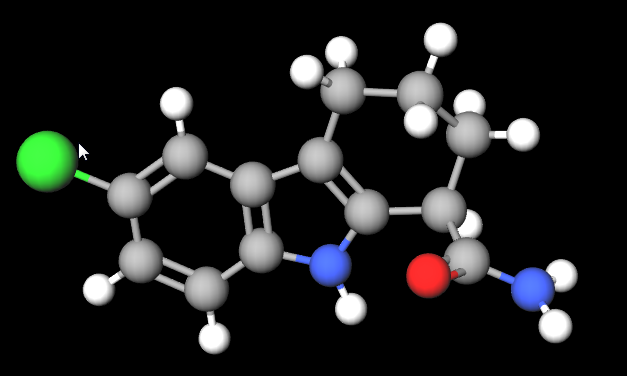
So have you ever been asleep and woke up wondering what the 6-chloro-2,3,4,9-tetrahydro-1H-carbazole-1-carboxamide compound looks like*? Well wonder no more. You can now view and build 2d and 3d models of molecules. Molview is an open-source web app to help build those chemistry and biology models. http://molview.org/

There is a pdf manual you can download to help get started. Since this is HTML5 based it should work pretty much on any device.


By the way 6-chloro-2,3,4,9-tetrahydro-1H-carbazole-1-carboxamide compound looks like this.


(* In a spirit of openness, I have no idea what 6-chloro-2,3,4,9-tetrahydro-1H-carbazole-1-carboxamide is. It came up when I started typing in the search box and I though it looked cool.